Loading…
WordPress migrationWebsites
Leave WordPress.
Keep everything you've built.
Your content. Your rankings. Your customers. Rebuilt on faster, more secure technology without the plugin maintenance.
- No plugin upkeepWe handle the updates
- Faster pagesBuilt to load quickly
- You own itSite and accounts
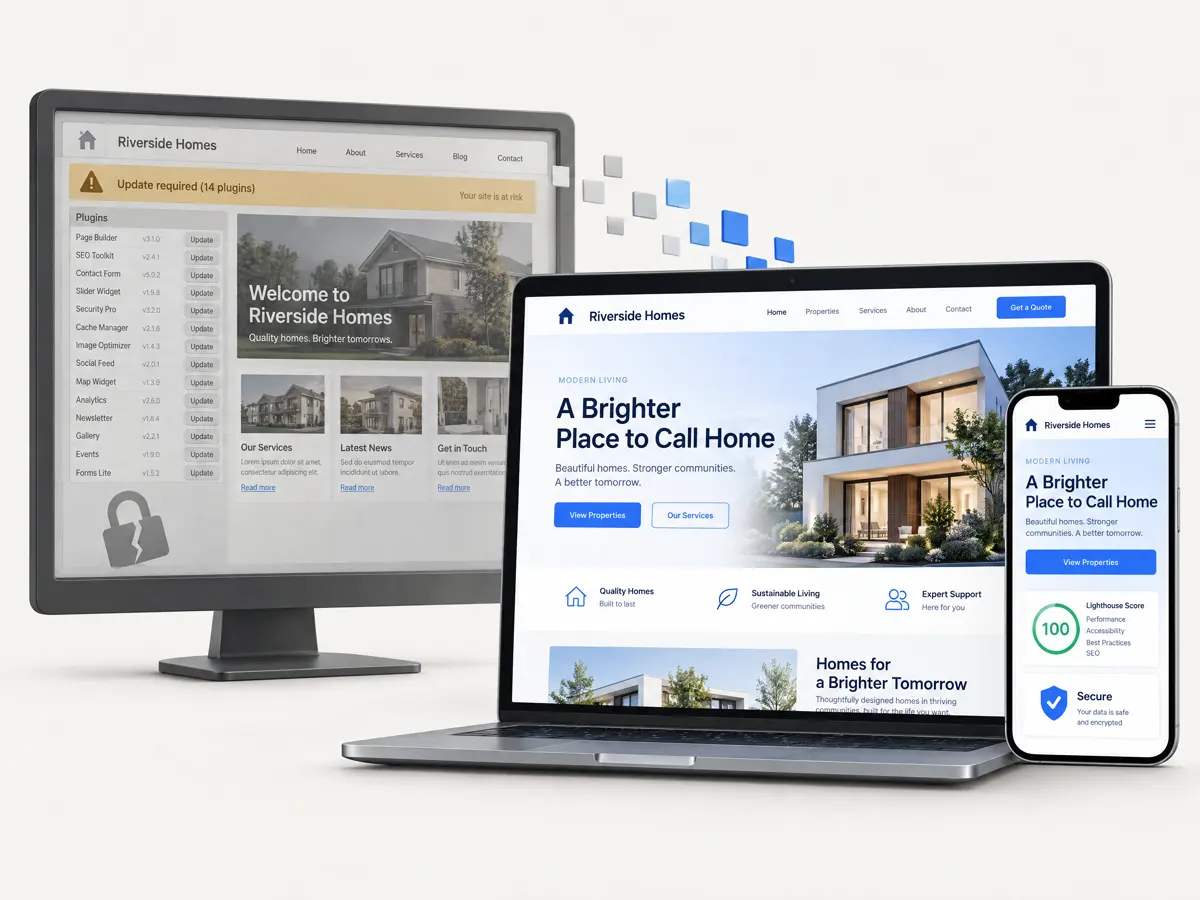
Before and after
What changes when you move.
Pick any row for a plain-English explanation. When we migrate a WordPress site to Next.js (a modern way of building websites), this is what is different underneath.
A typical WordPress site is assembled from add-ons called plugins, each written by a different company or person and each needing its own updates. Patchstack found that 91% of the new security weaknesses (vulnerabilities) in the WordPress ecosystem in 2025 were in plugins (Patchstack). A Canarlo site is one piece of software with far fewer outside parts. A lock file records the exact version of each part, so the site builds the same way every time. A lock file doesn't apply updates, though: we apply and test the security updates ourselves, as part of Ongoing Support.
Ask Mizu about thisYour team changes the site in an editing screen (a CMS, short for content management system). On WordPress, the controls for search settings, forms and redirects usually live in separate plugins, each with its own settings page. On a Canarlo site they are part of one screen designed around your content, and you choose who can change what. It isn't the WordPress editor, so we agree how your content is organised with you before we build, and give your team written instructions at the end.
Ask Mizu about thisWordPress runs on a programming language called PHP, and each PHP version stops getting fixes after a few years. PHP's own support table lists PHP 8.2 security support ending on 31 Dec 2026, and BleepingComputer reports that PHP 8.1 and older no longer receive updates. When a host retires an old version, the site may need work to keep running, and that work tends to arrive on someone else's timetable. A Canarlo site doesn't use PHP. It runs on hosting in your own accounts, with the database in London, and when a version reaches end of life it's our job to move it on.
Ask Mizu about thisQuick pages keep visitors and help your search rankings. On WordPress, speed depends on your theme, how many plugins load and how well caching (keeping ready-made copies of pages) is set up. We build the pages to load quickly from the start and aim for good Core Web Vitals (Google's measures of how fast a page feels). Mizu's free check shows your own site's current figures, where Google's speed test answers.
Ask Mizu about thisOn WordPress the admin login page sits on your public website, so strangers and automated programs can find it and keep guessing passwords. On a Canarlo site, editing happens in a separate app with a managed sign-in (we use a service called Supabase Auth), so there is nothing to find on the public site. The public pages can only read what you have published, and the database enforces that on every table (a rule called row-level security). Neither choice makes a site safe on its own. What helps is fewer parts open to the public, and someone keeping them up to date.
Ask Mizu about thisOn a typical WordPress site you rent a theme, several plugins and hosting from different companies. With a Canarlo site, the code is stored in your own repository (a shared store for the site's files), the hosting is in your own Vercel and Supabase accounts, and there are no licence fees. Any competent developer can take it over, and the code is yours whether or not we keep working together.
Ask Mizu about this
Neither platform is safe by itself. A well-kept WordPress site can be secure. The difference is how many separate parts you have to keep current, what is open to the public, and who does the updating. With a Canarlo build there are far fewer separate third-party parts, no public admin login, and the updates are done for you.
A Canarlo site still needs updates too. We apply and test them under Ongoing Support.
Free site check
See what WordPress is costing you.
Enter your website address and Mizu will look at it while you watch. It's free, and there is nothing to install.
Want it in writing? Ask for a written assessment from the team after Mizu's check. Book a call
What Mizu looks at
- Speed and Core Web VitalsHow quickly the page loads on a phone, using Google's speed test when it answers.
- What it's built withWhether it's WordPress, the PHP version if the server shows it, and how many plugins are visible in the page.
- Public security signalsThe protective settings your server shows to browsers, and whether your WordPress version is on show.
- Search basicsTitles, descriptions, headings, mobile friendliness, HTTPS and your sitemap.
- How big a move looksA rough size for a migration, worked out from those signals.
Why now
Keeping WordPress current is a faster race than it used to be.
Nothing here means something is about to go wrong with your site. It does mean updates matter sooner than they used to. This is what has been reported lately, with a source beside each claim.
PHP2Shell, 21 Oct 2026
Two serious flaws in PHP, the language WordPress runs on
- Two flaws, CVE-2026-109618 and CVE-2026-109619, each scored 9.2 on a 10-point severity scale.SecurityWeek
- They can let an attacker run their own code on a server without logging in.BleepingComputer
- Fixes shipped in PHP 8.5.12, 8.4.27, 8.3.36 and 8.2.35.BleepingComputer
- Security firms have reported attempts to exploit them.SecurityWeek
- PHP 8.1 and older no longer get updates from the PHP project.BleepingComputer
WP2Shell, July 2026
A flaw that could let an outsider create an admin account
- CVE-2026-60137 (a way to slip commands into the site's database) and CVE-2026-63030 (a flaw in how WordPress handles batched requests) can be chained together.CyberInsider
- The chain starts without a login and can end with a new administrator account on the site.CyberInsider
- Fixed in WordPress 7.0.2, 6.9.5 and 6.8.6, depending on your version.CyberInsider
- An AI model reportedly found the chain with substantial help, in a little over ten hours of runtime for roughly $25.CyberInsider
- Patchstack says attackers are actively exploiting it.CyberInsider
Patchstack, State of WordPress Security 2026
11,334 new vulnerabilities across the WordPress ecosystem in 2025
- 11,334 new vulnerabilities (security weaknesses) were found in the WordPress ecosystem in 2025.Patchstack
- 91% were in plugins and 9% in themes.Patchstack
- For the most heavily exploited, the typical time (a weighted median) to first exploit was five hours.Patchstack
What has changed with AI
Tools that help find weaknesses have become cheaper, and that helps defenders and attackers alike. A Searchlight Cyber researcher reportedly used an AI model to find the WP2Shell chain in a little over ten hours of runtime, for roughly $25 (CyberInsider). Anyone can use the same tools, so "we'll update it when we get round to it" is a less comfortable plan than it used to be.
What updating can and can't do
Updating still matters, and it does fix the problem in front of you. If you stay on WordPress, keep WordPress, PHP and your plugins up to date, remove the ones you don't use and keep backups you have tested. Moving isn't about WordPress being broken. It's about not having to do that job every week yourself, which is the maintenance we take on.
What we migrate
Everything your site does, and the search standing it has earned.
Moving away from WordPress means moving more than pages. Search rankings are the usual worry, so the list of addresses comes first and is signed off before anything is built.
Search rankings and addresses
For every page in scope, the old address is kept or forwarded to its new home (a permanent redirect, known as a 301), and titles, descriptions and other search details are carried over. After launch we check Google Search Console (Google's free tool for site owners) for errors. We can't promise a ranking, but this is how you protect the ones you have.
Pages and posts
Your content, its structure and the links between pages come across. Layouts built with a page builder (a drag-and-drop design plugin) are rebuilt rather than copied, so you don't carry its clutter with you.
Media
Images, PDFs and downloads move with their descriptions (alt text), and images are served in modern formats at the right size.
Forms and basic integrations
Contact and enquiry forms are rebuilt and sent to your inbox or your CRM (your customer database). Basic integrations, such as a mailing-list sign-up, are included. Anything more involved makes it a Bespoke migration.
Shops (WooCommerce)
WooCommerce makes it a Bespoke migration. Products, orders, payments and tax rules are a project in their own right, and we'd rather scope it properly than guess.
Users and members
Editor and admin accounts become accounts in your new editing screen. Members, customers or subscribers are scoped with you, including whether people will need to reset their passwords.
Evidence
A real migration, audited before launch: Captain Creps.
Captain Creps is a sneaker store whose old WordPress site we audited ahead of its move to a new platform. Before launch we checked every address the old site is known to have, to see which would still work at the same address.
Pre-launch audit, 22 Oct 2026These are results from a migration audit run before launch, on a preview site. They are not post-launch performance.
24,706
old addresses audited
From the old sitemap, the live product list and Google Search Console.
98.4%
of Google clicks go to addresses that stay exactly the same
Measured on the top 1,000 pages in the Search Console export (238,206 clicks).
60.6%
of old addresses keep the same address
36.1% are forwarded permanently (a 301 redirect), mostly tag pages that carry 0.3% of clicks.
Not everything carried over yet: 789 addresses (3.2%) had no page at the time of the audit, mostly products not yet moved across. Finding those before launch, not after, is what the audit is for.
Source: Captain Creps SEO URL coverage report, 22 October 2026.See our work
Process
Five steps, and you sign off the plan before we build.
A small site usually runs four to eight weeks from the plan to switch-over.
01
Audit
A free check of your current site, run by Mizu: speed, what it's built with, public security signals and search basics. Then a call, if you want one.
Check my site02
Plan the move
We list every page, plugin and form, then write a map matching each old address to its new one, and agree how your content will be organised. You sign it off before we build.
03
Rebuild
The new site is built on a private preview address from week one, so your team can look around and start editing while we build.
04
Switch over
We test every forwarded address against the map, then point your domain at the new site once it's checked. The old site stays up until then, so visitors see no gap.
05
Care
Website membership is £150/month, month to month: hosting, daily backups, uptime and security monitoring, security patches and upgrades, and 1 hour of changes a month.
Pricing
What the money buys.
Launch migration
For small sites that fit the scope below. A WordPress migration is a Launch website: the price is fixed and agreed in writing before work starts.
£2,950 fixed
Bespoke migration
For larger or more complex sites: more pages or templates, shops, custom plugins or large archives. It is a Bespoke website, scoped in writing before work starts.
From £7,500
Website membership
After go-live: hosting, daily backups, uptime and security monitoring, security patches and upgrades, and 1 hour of changes a month. Month to month, cancel any time.
£150/month
What the Launch migration covers
- Up to 15 pages and 3 templates (a template is a reusable page layout, such as a home page, a standard page or a blog post).
- Standard content migration: your text, images and documents.
- Forms and basic integrations, such as email notifications or a mailing-list sign-up.
- SEO preservation and redirects for those pages: addresses kept or forwarded, titles and descriptions carried over.
What makes it a Bespoke migration
- WooCommerce shops
- Member areas and customer accounts
- Custom plugins and bespoke features
- Large archives, such as hundreds of posts or products
Anything in this list makes it a Bespoke migration, scoped in writing before work starts. We would rather price it properly than guess.
Questions
What people ask before they brief us.
Will I lose my Google rankings?
We can't promise your rankings stay exactly where they are, and nobody honest can. What we do is protect them. For every page in the migration, the old address is kept or permanently forwarded (a 301 redirect) to its new home, and titles, descriptions and other search details are carried over. We test that list before the switch, then check Google Search Console for errors after launch and fix anything that slipped through. Rankings can wobble for a short while after any migration. A drop that lasts is usually a missed redirect or a page that went missing, which is exactly what the list is there to catch.
Can my team still edit content?
Yes. The new site comes with an editing screen (a CMS, short for content management system) built around your content, with roles so the right people can change the right things. It isn't the WordPress editor, so we agree how your content is organised with you during planning, and hand over written instructions at the end.
What about my plugins?
While we plan the move we list every plugin and what it does. Most fall into three groups: things the new site does natively, like search settings, redirects, image handling and caching; things we rebuild as part of the site, like forms and simple galleries; and things nobody needs any more, which we drop. Shop, member-area and booking plugins are bigger jobs, and we scope those as a Bespoke migration.
How long does it take?
A focused marketing site typically takes four to eight weeks, with a private preview address from week one. Larger sites are phased, with dates agreed up front. WooCommerce and other complex builds are scoped in a call before we give a date.
Is WordPress really unsafe?
No. WordPress itself is actively maintained, and fixed versions came out for the July 2026 flaws. A small WordPress site with few plugins, updated within days and properly backed up, can be run safely, and if that is you, moving isn't urgent. The risk grows with the number of plugins (91% of the new WordPress vulnerabilities Patchstack counted in 2025 were in plugins) and with how long updates wait. A Canarlo site isn't safe just because of what it's built with. What changes is that there are far fewer separate third-party parts to keep current, nothing for the public to log in to, and the updates are done for you.
Do I have to move hosting?
Yes, in practice. The new site isn't built on PHP, so it can't run on your WordPress host. It goes live in your own Vercel account (the hosting company), with your content stored in your own Supabase project (the database service) in London, so you own the accounts as well as the code. Once you're happy with the new site, you can cancel the old hosting.
What happens to my email and domain?
Your domain stays registered where it is, and you stay the owner. At switch-over we change only the DNS records (the settings that point your domain at a server) that send the website to its new home. Email is separate from the website, so mailboxes on Google Workspace or Microsoft 365 aren't touched. If your email is bundled with your old web host, which is common, we spot it during planning and move it first, so cancelling the hosting never cuts off your inbox.
Is this the same as going headless?
Not quite. Headless means WordPress stays as the editing back end while a separate front end (the part visitors see) shows the site. That shrinks what the public can reach, but WordPress and its plugins still run somewhere and still need updating. Our default is to replace WordPress with an editing screen that has no PHP in it. If you have a strong reason to keep WordPress behind the site, say so on the call and we'll tell you honestly whether it fits.
My WordPress site has been hacked. Can you help?
Tell us on the call. Cleaning up a live compromise is a separate job and we're not an incident-response service, so if the site is still serving malware, deal with that first with your host. If you're rebuilding anyway, we start from clean code and export your content rather than copying the install, and we check what we export for injected links and spam, so a compromised theme or plugin doesn't come with you.
Related
Where to go next.
- WebsitesThe full service behind this page: design, build and an editing screen for a site that wins the work.
- EcommerceWhere a WooCommerce shop goes when it has outgrown its plugins: your rules, your checkout.
- Ongoing SupportAfter go-live: hosting, backups, monitoring and security patches under Website membership, from the engineer who built it.
Moving off WordPress?
Tell us what you're running.
A free check of your current site, a plan for the move, and a fixed price for small sites. We're a Leeds studio working with UK businesses, and there's no pressure to switch.
- Senior engineers, not salespeople
- Clear scope and pricing
- No lock-in, you own everything